
Syncing Ingests
How to sync ingests to each other
Ingest Player Buffer
The properties dialog of every ingest player has a Buffer Size (ms) slider that goes between 250ms and 10,000ms.
This setting can be adjusted to both help smooth out network fluctuations as well as introduce a predictable amount of delay.

This delay can be leveraged to bring two ingests closer in sync to each other.
Syncing Ingests
Follow these steps to sync ingests
- Start sending a live feed into both ingests
- Open the webpage https://syncer.live so that it is visible on both feeds. Syncer will work across devices, even if the stream feeds are in different locations.
- Show both feeds on the irl.run OBS Remote so that the syncer timers are visible. You can accomplish this with studio mode or by putting both ingest players in a single scene, resized so both feeds are visible.
- Use a screenshot tool to capture the two feeds
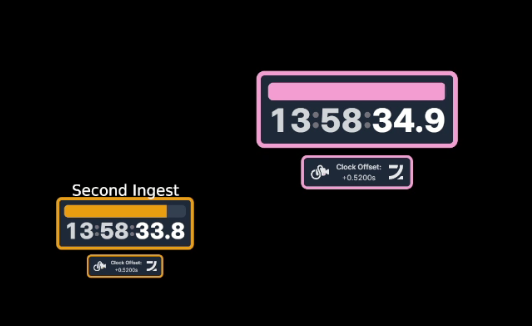
Here you can see the First Ingest (Pink) is about 1100 ms ahead of the Second Ingest (Orange).
- Open the Ingest Player properties of the ingest with the lowest delay (higher time value).
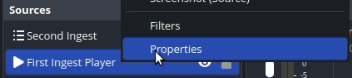
Right click the Ingest Player and select Properties
- Take the difference between the time shown on both ingests and add that as delay in milliseconds.

Added 1100 ms to the First Ingest player's Buffer Size.
- Wait for the player's buffer to stabilize and repeat the process until the desired sync is obtained.
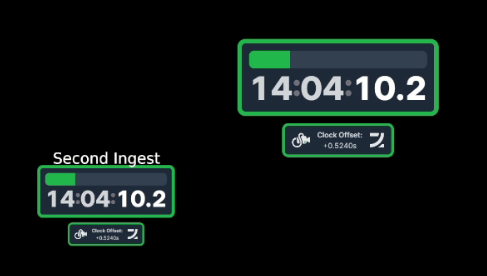
Ingests are now closely synched
Info:
Total possible sync compensation with this method is roughly 9 seconds. If the offset is worse than 9 seconds, you may need to adjust the streaming device's settings first.
SRT vs RTMP
This will tend to work best if both ingests are on the SRT(LA) protocol. Experiences may vary if any ingest is using RTMP due to accumulating delay when streaming over an unreliable network.